Move an arm through multiple waypoints
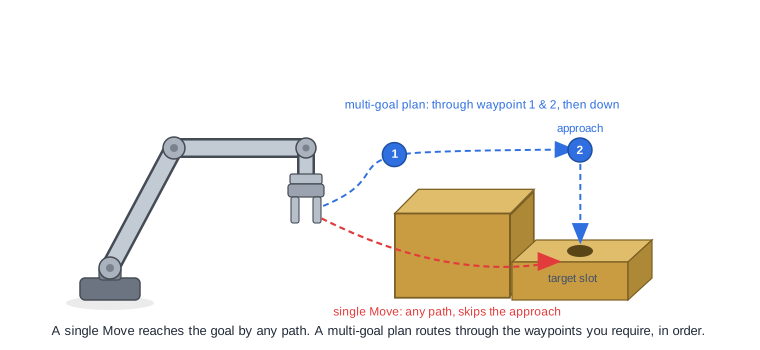
Sometimes you need the arm to pass through a specific approach point before
reaching a target, to thread between two pieces of equipment in a set order,
or to follow a sequence of stations in one motion. A single Move to the final
pose lets the planner choose any collision-free path, which may skip the intermediate
poses you care about.
armplanning.PlanMotion accepts an ordered list of goals and plans one
continuous trajectory that hits each in turn. This page shows how to build a
multi-goal request, mix goal types across waypoints, and recover a partial
result when a later waypoint is infeasible.
Go SDK only
Routing one plan through multiple goals uses armplanning.PlanMotion, an
in-process Go function. The motion service Move API takes a single
destination, so multi-waypoint planning runs in Go alongside the planner rather
than over the service API. For the difference between planning in process and
calling the service, see Verify a motion plan.
Why route through ordered goals
One multi-goal plan differs from chaining separate Move calls:
- Each
Moveplans and executes independently, so the arm stops at every waypoint instead of flowing through it. - Each call plans from scratch with no knowledge of the goals that follow, so it can reach a waypoint in a configuration that makes the next one unreachable.
- There is no single trajectory you can inspect, validate, or replay.
A multi-goal PlanRequest produces one trajectory spanning every segment. The
planner hits each goal in the order you list it, and uses each waypoint’s solved
configuration as the start of the next segment, so the whole motion is
continuous and consistent.
Build a multi-goal PlanRequest
PlanRequest.Goals is an ordered list of PlanState values. Each PlanState
is either a set of Cartesian poses (FrameSystemPoses) or a joint configuration
(FrameSystemInputs), and you can mix the two across waypoints. The
StartState gives the configuration the plan begins from.
import (
    "go.viam.com/rdk/motionplan/armplanning"
    "go.viam.com/rdk/referenceframe"
    "go.viam.com/rdk/spatialmath"
    "github.com/golang/geo/r3"
)

// Build the frame system from the running machine.
fsCfg, err := machine.FrameSystemConfig(ctx)
if err != nil {
    logger.Fatal(err)
}

// Assemble the configured parts into a frame system the planner can use.
fs, err := referenceframe.NewFrameSystem("robot", fsCfg.Parts, nil)
if err != nil {
    logger.Fatal(err)
}

// The start state is required and cannot be nil. To plan from where the arm is
// now, read its current joints with arm.JointPositions and use those here.
startState := armplanning.NewPlanState(nil, referenceframe.FrameSystemInputs{
    "my-arm": []referenceframe.Input{0, 0, 0, 0, 0, 0},
})

goals := []*armplanning.PlanState{
    // Waypoint 1: a Cartesian approach pose for the gripper.
    armplanning.NewPlanState(referenceframe.FrameSystemPoses{
        "my-gripper": referenceframe.NewPoseInFrame("world",
            spatialmath.NewPose(
                r3.Vector{X: 400, Y: 0, Z: 300},
                &spatialmath.OrientationVectorDegrees{OZ: -1},
            )),
    }, nil),
    // Waypoint 2: a specific joint configuration.
    armplanning.NewPlanState(nil, referenceframe.FrameSystemInputs{
        "my-arm": []referenceframe.Input{0, -1, 1, 0, 1, 0},
    }),
    // Waypoint 3: a relaxed goal expressed as a pose cloud.
    armplanning.NewPlanState(referenceframe.FrameSystemPoses{
        "my-gripper": referenceframe.NewPoseInFrameWithGoalCloud("world",
            spatialmath.NewPose(
                r3.Vector{X: 350, Y: 200, Z: 250},
                &spatialmath.OrientationVectorDegrees{OZ: -1},
            ),
            &referenceframe.PoseCloud{X: 5, Y: 5, Z: 5, Theta: 10}),
    }, nil),
}

plan, _, err := armplanning.PlanMotion(ctx, logger, &armplanning.PlanRequest{
    FrameSystem: fs,
    StartState:  startState,
    Goals:       goals,
})
if err != nil {
    logger.Fatal(err)
}
Each goal names the frame it constrains, so a Cartesian waypoint can target the gripper frame while a configuration waypoint pins the arm’s joints. Pose clouds work as goals too, which lets you relax the waypoints where close enough is fine. See Pose clouds for when to use them.
Read the trajectory
The returned Plan is one continuous trajectory across all segments.
plan.Trajectory() is a slice of joint configurations, one per step, from the
start state through the last goal:
for i, step := range plan.Trajectory() {
    fmt.Printf("step %d: %v\n", i, step["my-arm"])
}
There is no break in the trajectory at a waypoint: the steps that reach
waypoint 1 flow directly into the steps that leave it for waypoint 2. This is
the property you lose when you chain separate Move calls, where each call is
its own plan with a full stop in between.
Recover a partial plan when a waypoint fails
If a later waypoint is unreachable, the whole request fails by default and you
get no trajectory, even for the waypoints that did solve. Set
ReturnPartialPlan to get the trajectory up to the last waypoint the planner
solved:
opts := armplanning.NewBasicPlannerOptions()
opts.ReturnPartialPlan = true

plan, _, err := armplanning.PlanMotion(ctx, logger, &armplanning.PlanRequest{
    FrameSystem:    fs,
    StartState:     startState,
    Goals:          goals,
    PlannerOptions: opts,
})
The partial trajectory ends at the last solved waypoint, which tells you which waypoint is infeasible: if a three-goal request returns a plan that stops at waypoint 2, waypoint 3 is the one to investigate. From there, loosen that waypoint (for example with a pose cloud), move it, or check that it is reachable and collision-free.
What’s next
- Pose clouds: relax a waypoint into a region of acceptable poses.
- Verify a motion plan: plan without executing to check feasibility first.
- How motion planning works: why a goal can be infeasible and what to try.
Was this page helpful?
Glad to hear it! If you have any other feedback please let us know:
We're sorry about that. To help us improve, please tell us what we can do better:
Thank you!