Relax a goal with a pose cloud
By default Move requires a destination pose, which defines where the end effector must
move to, and the planner holds the end effector to it tightly. For many tasks that is more
precise than needed. Dropping a part into a bin, sanding a flat surface, or pointing a
camera at an injection molding station all have different tolerance requirements for the destination pose,
and demanding tight tolerances on the target pose can lead to issues. An over-constrained goal makes the planner work harder, fail more often, and sometimes reject a goal that would have been valid for the task.
A pose cloud replaces the exact goal with a region of acceptable poses. You
give the planner a target pose plus a set of tolerances, and any pose within
those tolerances is considered valid. This page explains what a pose cloud
relaxes and how to use a pose cloud with the motion service.
When to reach for a pose cloud
- Target regions. When any spot in an area is an acceptable place to move, use a pose cloud. For example, place a cup anywhere on a clear area of the table.
- Grasp ranges. When an object can be grasped from a range of positions or rotations, a pose cloud lets the planner choose a reachable grasp. For example, grasp a cup that may sit at any rotation about its vertical axis.
- Dynamic collisions. When the target area may contain obstacles, a pose cloud lets the planner place the object at a clear spot while avoiding collisions at the destination.
- Kinematic constraints. When a goal fails or plans slowly because the arm struggles to reach that exact pose, relaxing the destination tolerance enlarges the solution space and often turns a failing plan into a success.
Pose clouds are powerful when coupled with motion constraints: together they describe the motion you want without pinning down the destination exactly. Moving a cup of water is a good example. You define an orientation constraint to keep the cup upright, but you may not know which exact target pose lets the arm hold that orientation across its workspace. A pose cloud lets the planner choose a destination within a region instead:
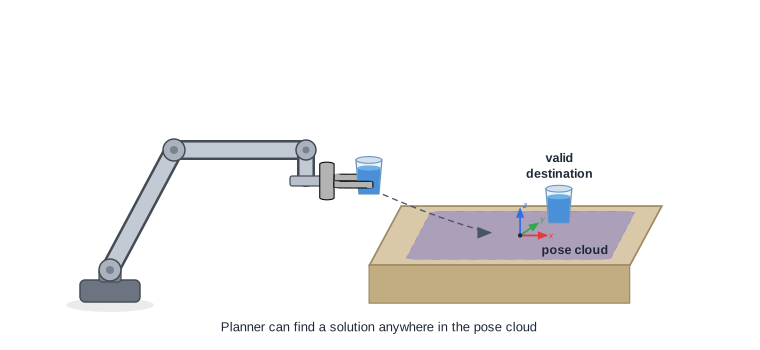
Relaxing the destination pose
A pose cloud is modeled as a box with the destination pose at its center. The size of the box
in three dimensions defines a tolerance on the goal pose, and the orientation and Theta components define a
rotation tolerance for the end effector frame. The destination may land anywhere within the
box and rotation tolerance.
&referenceframe.PoseCloud{
    X:     50, // 50 mm of slack in x
    Y:     50, // 50 mm of slack in y
    Theta: 90, // up to 90 degrees of rotation about the orientation axis
    // Z, OX, OY, and OZ are omitted, so they default to 0 and stay exact.
}
| Field | Units | Relaxes | Default |
|---|---|---|---|
X, Y, Z | mm | Position along each axis | 0: position held exact |
OX, OY, OZ | unitless | The orientation vector components (the direction the tool points) | 0: direction held exact |
Theta | degrees | Rotation about the orientation axis | 0: rotation held exact |
A tolerance of zero on a field holds that component to the exact target value; a
larger tolerance gives the planner more room on that component. You relax only what
the task allows: a part dropped into a wide bin can take large X and Y
tolerance while keeping Z tight, and a tool that may spin freely about its axis
can take a large Theta while keeping its pointing direction fixed.
The position tolerances (X, Y, Z) are millimeters and Theta is degrees. The
orientation-vector tolerances (OX, OY, OZ) are unitless deviations of the pointing
direction on a unit sphere, not angles: on its own, a value of 1 accepts any value for
that component, and 0 holds it exact. Because the pointing direction is a unit vector
(its components satisfy OX² + OY² + OZ² = 1), these leeways are coupled: more room on one
component leaves less on the others, and a wide orientation leeway interacts with Theta,
so a tolerance that is safe at a small rotation can let the tool tip too far at a larger one
(a held cup starts to spill).
Orientation vector normalization: If you build a goal pose whose orientation vector is
unset or all-zero (OX:0, OY:0, OZ:0), Viam normalizes it to the default OX:0, OY:0, OZ:1
before the leeways apply. A wide pose cloud is then measured against that default pointing
direction, not the one you intended, so set the goal’s orientation explicitly and verify the
resulting plan.
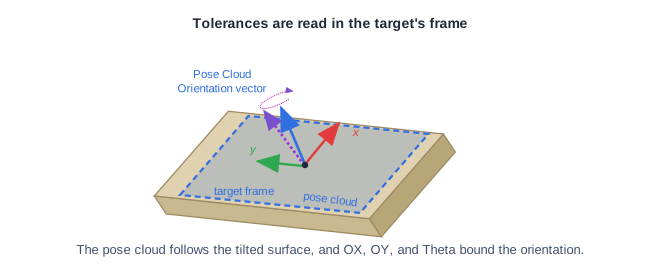
Tolerances are measured in the target’s frame
The tolerances are evaluated in the reference frame of the target, not in world coordinates. This matters when the target is tilted relative to the world.
Consider a gripper approaching an inclined surface. Express the tolerance in the surface’s own frame: large on the two in-plane axes so the tool can ride along the surface, and tight on the axis normal to the surface so it stays on the surface. Because a pose cloud uses the target’s frame, these tolerances follow the tilt of the surface directly.
Use a pose cloud with the motion service
A pose cloud travels with the destination pose. In Go, attach the pose cloud to the destination with
NewPoseInFrameWithGoalCloud, then pass that destination to Move. The pose is
the center of the region and the PoseCloud is the tolerance around it. This example includes an orientation constraint for the water example, so the cup stays upright for the whole motion, not only at
the goal.
import (
    "github.com/golang/geo/r3"
    "go.viam.com/rdk/motionplan"
    "go.viam.com/rdk/referenceframe"
    "go.viam.com/rdk/services/motion"
    "go.viam.com/rdk/spatialmath"
)

// Place the cup somewhere on the table. The exact spot does not matter, and the
// cup may end up rotated about vertical, but it must stay upright.
destination := referenceframe.NewPoseInFrameWithGoalCloud(
    "table", // the target frame: tolerances follow the table surface
    spatialmath.NewPose(
        r3.Vector{X: 0, Y: 0, Z: 0},                   // center of the region, on the table surface
        &spatialmath.OrientationVectorDegrees{OZ: -1}, // upright: the tool's z-axis points into the table
    ),
    // Tolerances are applied in the table frame, each as [-value, +value].
    &referenceframe.PoseCloud{
        X:     75,  // mm of slack across the table surface in x
        Y:     75,  // mm of slack across the table surface in y
        Z:     0,   // hold the cup on the surface
        Theta: 180, // degrees: any rotation about vertical; spinning the cup does not spill it
        // OX, OY, OZ stay 0, so the upright pointing direction is held exact.
    },
)

// Keep the cup upright along the whole path, within 5 degrees, not just at the goal.
constraints := &motionplan.Constraints{
    OrientationConstraint: []motionplan.OrientationConstraint{
        {OrientationToleranceDegs: 5},
    },
}

_, err = motionService.Move(ctx, motion.MoveReq{
    ComponentName: "my-gripper",
    Destination:   destination,
    Constraints:   constraints,
})
if err != nil {
    logger.Fatal(err)
}
Available through the Go SDK
The Go SDK provides NewPoseInFrameWithGoalCloud to attach a pose cloud to the destination.
The goal cloud travels in the Move request, so the motion service honors it on the server.
What’s next
- Configure motion constraints: restrict the path between poses, the complement to relaxing the goal.
- Move through waypoints: use pose clouds for the waypoints where close enough is fine.
- How motion planning works: why a larger solution set makes the search succeed more often.
Was this page helpful?
Glad to hear it! If you have any other feedback please let us know:
We're sorry about that. To help us improve, please tell us what we can do better:
Thank you!